Security and scam protection
Secure remote control. No chance for scammers.
How Agile Remote encrypts connections, who may access when, what we store and how the app protects against scam calls. No marketing fog.
Scam protection
When “Microsoft” calls, Agile Remote warns you.
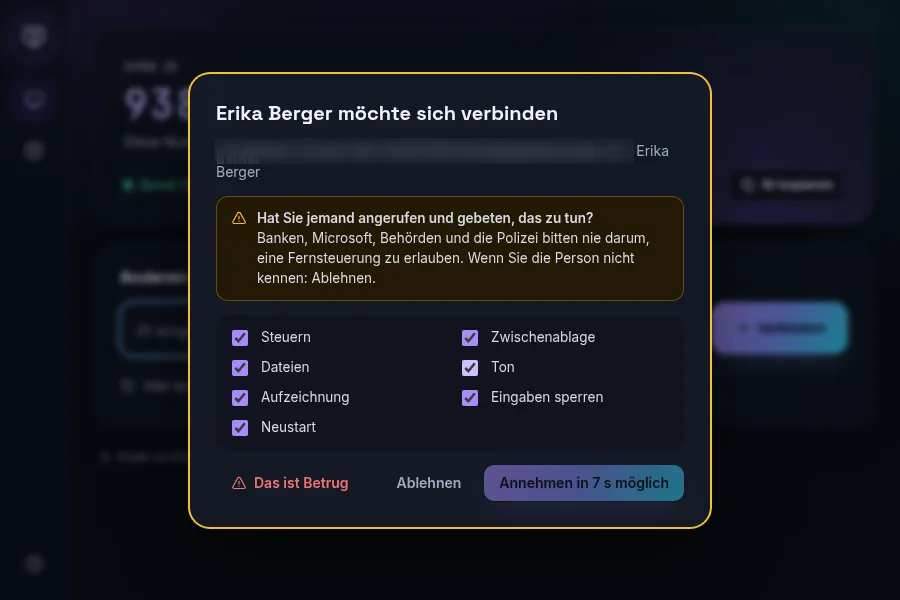
Scammers pretend to be your bank, Microsoft, a parcel service or the police and ask for remote access. That is why Agile Remote is deliberately careful with unknown callers.
- First connection from an unknown account: clear warning screen, accepting only after a delay
- “This is a scam” ends the session, suspends the caller’s account and reports the case to us
- Unattended access can only be set up on the device itself, never by the other side
- Notices on the download page and quick support: banks and authorities never ask for remote access
Security and scam protection
How it works
End-to-end encrypted
Video, input, clipboard and files travel via WebRTC with DTLS-SRTP directly between the devices. Even via our relay (TURN) the content stays encrypted; we cannot read it.
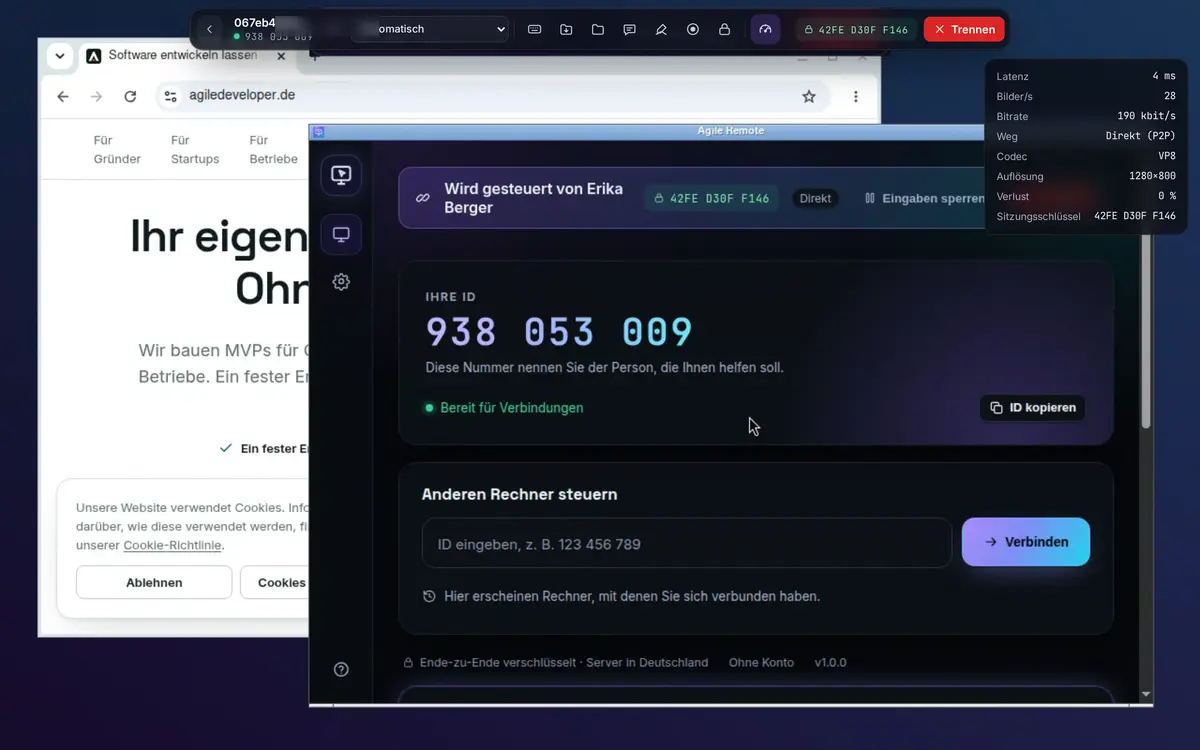
Session key to compare
Both sides show the same fingerprint of the connection. If it matches, nobody is in between.
Access only with consent
Without acceptance on the computer there is no picture. Unattended access requires a password (stored only as a scrypt hash) or your own account with permission.
Lockout against guessing
After five wrong passwords a device is locked for 15 minutes, longer each round. We also limit attempts per network address.
Always visible, always disconnectable
The controlled computer shows “controlled by …” with a disconnect button. Recording is announced, input can be blocked.
Protected accounts
Two-factor sign-in with an authenticator app and backup codes, new browsers confirmed by email code, view and end signed-in sessions.
Log of every session
Who connected to which computer when, with timeline and permissions. Exportable as CSV in the Team plan.
Signed app and updates
Every file is signed with our own Ed25519 key. The app verifies signature and checksum before every update. The desktop app is sandboxed with strict content rules.
Servers in Germany
Account, connection setup and relay run on our own servers in Nuremberg. We do not store screen contents. No tracking, data processing agreement (DPA) for businesses.
Verifiable
Same key on both sides.
The connection panel shows latency, path and the session key. The controlled computer shows the same key in its banner. Compare them on the phone, and you know the connection is yours.
To be honest
What you should know
- The app is not yet signed with a purchased code signing certificate. Windows and macOS therefore ask on first launch; the download page shows how to confirm.
- Recordings are made only on the controlling side in the browser and are not stored by us.
- Please report vulnerabilities to info@agiledeveloper.de; we respond quickly.
Can Agile Developer see my screen?
No. Content is end-to-end encrypted and travels directly between the devices or encrypted via our relay. We only see who connected to which device and when.
What if someone pushes me to install it?
Hang up and install nothing. If a session is already running, click “This is a scam”: the connection ends immediately and the caller’s account is suspended. Then change your passwords and, if in doubt, call your bank.
Where is my data stored?
On our servers in Nuremberg, Germany. Details are in the Agile Developer privacy policy.
Ready to help securely?
Create an account, download the app, share the ID. With scam protection from the start.
14 days of all Solo features · no payment details · then free for private use